
Digital Marketing for Nonprofits: A Practical Guide to Reaching More People
For nonprofits, digital marketing is about more than promoting an organisation. It can help bring people closer to a cause, inspire donations, recruit volunteers and make essential services easier to find. With limited time and budgets, a clear, focused approach can make every message work harder.
Whether your organisation is a small community group or a national charity, the foundations are the same: understand who you need to reach, communicate why your work matters and make it simple for people to take action.
Start with clear goals
Before choosing channels or creating content, decide what you want your marketing to achieve. A broad aim such as “raise awareness” is difficult to measure. A specific goal gives your team something practical to plan around.
Your objectives might include:
- Increasing regular donations or one-off gifts
- Attracting volunteers for a particular programme
- Helping more people access your services
- Growing an email list of supporters
- Encouraging registrations for an event or campaign
- Sharing evidence of your organisation’s impact
Choose a small number of priorities and set a timeframe. For example, you might aim to increase event registrations by 15% over three months. Clear targets help you decide what to publish and whether your activity is making a difference.
Understand the people you want to reach
Nonprofits often serve several audiences, each with different needs. A person looking for support may need clear, reassuring information, while a potential donor may want to understand how contributions are used. Volunteers may be looking for a meaningful role that fits around their existing commitments.
Think about the questions each audience is likely to ask. What are they trying to do? What might prevent them from taking the next step? Which channels do they already use? Answers can come from conversations with service users, feedback forms, supporter surveys and the questions your team receives most often.
Use this insight to shape your content. Avoid assuming that everyone understands sector terminology or already knows the problem your organisation addresses. Plain, respectful language makes your message easier to understand and act on.
Make your website easy to use
Your website is often the place where people decide whether to donate, volunteer, seek help or learn more. Make those actions easy to find, especially on mobile devices.
A useful nonprofit website should:
- Explain what your organisation does and who it supports
- Show clear routes to key actions, such as donating or getting help
- Provide up-to-date contact details and service information
- Load quickly and work well on phones and tablets
- Use accessible design, including readable text and descriptive image text
- Explain how donations are used, where possible
Review the journey from the first page a visitor sees to the action they want to take. If donating requires several confusing steps, or service information is difficult to find, small changes to the website could have a meaningful impact.
Use search to connect with people looking for help
Search engine optimisation (SEO) helps people find your website through search engines. For nonprofits, this can be especially important when someone is looking for local support, information about an issue or a way to get involved.
Start by using the words your audiences are likely to search for. A local service page, for example, should clearly state the area covered and the support offered. Useful articles can answer common questions, explain a topic or point readers towards reliable help.
Good SEO is not about repeating keywords unnecessarily. It is about creating helpful, accurate pages, using clear headings and keeping information current. Make sure important pages have descriptive titles and that your website can be navigated by people using assistive technology.
Tell your story with care
Stories can help supporters understand the human impact of your work. They can also give people a clearer picture of the challenges your organisation is trying to address. But storytelling should always respect the dignity, privacy and choices of the people involved.
Get informed consent before sharing someone’s personal story, image or identifying details. Be clear about where and how the content may be used, and avoid presenting people only through the difficulties they face. Where appropriate, focus on their perspective, strengths and agency. If consent or safety is uncertain, use anonymised examples or share information about the issue without identifying an individual.
Choose social media channels thoughtfully
It can be tempting to post on every social media platform, but maintaining a small number of channels well is often more effective. Choose platforms based on where your audiences spend time and what you can realistically manage.
Social media content might include campaign updates, practical information, volunteer opportunities, event invitations, impact stories and answers to common questions. A simple content calendar can help your team plan ahead while leaving room to respond to timely issues.
Social media is also a conversation. Reply to questions where you can, thank people for sharing your work and make clear how someone can contact you privately if a query involves sensitive information. Set expectations for response times, particularly if your organisation provides support services.
Build an email community
Email gives nonprofits a direct way to keep in touch with supporters. It can be useful for sharing campaign news, reporting on results, promoting events and inviting people to take part in future activities.
Offer a clear reason to sign up and explain what subscribers can expect. Ask only for the information you need, make it easy to unsubscribe and send emails at a frequency you can sustain. Personalise messages where it is appropriate, but ensure that personalisation feels relevant rather than intrusive.
For UK organisations, email marketing must comply with applicable data protection and electronic marketing rules. Keep consent and preference records where required, provide clear privacy information and seek specialist advice if you are unsure about your responsibilities.
Consider paid advertising
Paid digital advertising can help a nonprofit reach people beyond its existing audience. Options include search adverts, social media campaigns and local display advertising. It can be particularly useful for time-sensitive fundraising appeals, events or service announcements.
Start with a defined audience, a clear message and one main action. Set a modest test budget, then review the results before increasing spend. Measure meaningful outcomes such as completed donations, registrations or enquiries, rather than relying only on views and clicks.
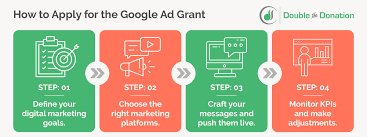
Some charities may be eligible for advertising support programmes, including Google Ad Grants. Eligibility, availability and programme rules can change, so check the current requirements and make sure your organisation can manage the account effectively.
Measure what matters
Measurement helps you understand which activity is useful and where to focus limited resources. Choose a few indicators that relate directly to your goals.
- For donations: completed gifts, average donation value and regular-giving sign-ups
- For volunteering: applications, enquiries and successful placements
- For service information: visits to key pages, relevant enquiries and referrals
- For email: subscriptions, click-throughs and completed actions
- For events: registrations, attendance and follow-up engagement
Use analytics responsibly and be mindful of privacy. Data should help your organisation make better decisions, not become a reason to collect information you do not need. Review performance regularly, share what you learn with colleagues and adjust your approach when something is not working.
Make accessibility part of the plan
Accessible digital marketing helps more people engage with your organisation. Use clear language, strong colour contrast, descriptive headings and captions for video. Add meaningful alternative text to images, and make sure important content is not available only through images or audio.
Accessibility is an ongoing practice, not a final check before publication. If possible, include people with different access needs in testing your website, emails and campaign materials.
Make a plan your team can maintain
The most effective strategy is one your organisation can keep going. A small team might focus on a useful website, a regular email and one social media channel before adding more. Reuse content thoughtfully: a report could become a short article, an email update and several social posts.
Assign clear responsibilities, agree a realistic publishing schedule and keep a record of what performs well. This makes digital marketing less dependent on last-minute effort and helps knowledge stay within the organisation when staff or volunteers change.
Small, consistent steps can make a difference
Digital marketing does not require a large budget or a presence on every platform. It requires a clear purpose, an understanding of your audiences and useful communication that makes the next step easy. By combining an accessible website, thoughtful content, appropriate channels and meaningful measurement, nonprofits can build stronger relationships and support their work over time.
8 Digital Marketing Tips to Help Charities Inspire Support and Boost Donations
- Set clear goals for every campaign.
- Tell compelling stories that show your impact.
- Make donation pages simple and mobile-friendly.
- Use email to nurture supporter relationships.
- Share accessible content across social channels.
- Add clear calls to action to every post.
- Track results and adjust what is not working.
- Thank supporters promptly and personally.
Set clear goals for every campaign.
Set clear goals for every campaign so you know what success looks like and where to focus your time and budget. Rather than aiming simply to “raise awareness”, choose a specific, measurable outcome, such as increasing donations, recruiting volunteers or encouraging more people to use a service. A clear goal will help you shape your message, choose the right channels and assess what worked once the campaign ends.
Tell compelling stories that show your impact.
Tell compelling stories that show your impact by bringing your organisation’s work to life through real experiences and outcomes. Share how your support has made a difference, using clear, specific details rather than broad claims. Always seek informed consent, protect people’s privacy and represent their experiences with dignity. A thoughtful story can help supporters understand why your work matters and inspire them to get involved.
Make donation pages simple and mobile-friendly.
Make donating as straightforward as possible. Keep your donation page focused, with a clear call to action, a small number of easy-to-understand donation options and a short form that asks only for essential information. Ensure it works smoothly on mobile, where buttons should be easy to tap and text simple to read. A quick, secure and reassuring donation experience can help supporters complete their gift without unnecessary effort.
Use email to nurture supporter relationships.
Use email to build lasting relationships with your supporters, not just to ask for donations. Share thoughtful updates about your work, explain the difference their support makes, and invite them to events, campaigns or volunteering opportunities. Keep messages relevant, accessible and regular, and make it easy for people to manage their preferences or unsubscribe. With useful, respectful communication, email can help supporters feel informed, valued and connected to your cause.
Share accessible content across social channels.
Share accessible content across your social channels so more people can engage with your nonprofit’s message. Use clear, plain English, add captions to videos, include descriptive alternative text for images and ensure text is easy to read against its background. Where possible, provide transcripts for audio and avoid relying on colour or visuals alone to convey important information. These simple steps help make your updates more inclusive and easier to understand.
Add clear calls to action to every post.
Add a clear call to action to every post so readers know what to do next. Whether you want them to donate, volunteer, share your campaign, sign up for updates or find support, make the next step specific and easy to follow. Use direct, welcoming language such as “Donate today” or “Register to volunteer”, and include a working link where relevant. A focused call to action helps turn interest in your cause into meaningful support.
Track results and adjust what is not working.
Track the results of your digital marketing to see what is helping you reach your goals and what needs to change. Focus on meaningful measures, such as donations, volunteer enquiries, event registrations or visits to key service pages, rather than clicks alone. Review performance regularly, learn from your audience’s responses and adjust your content, channels or timing where needed. Small, evidence-based changes can help your nonprofit make better use of limited time and resources.
Thank supporters promptly and personally.
Thanking supporters promptly and personally helps build trust and shows that every contribution matters. Send a timely message that acknowledges the person’s specific support, whether they donated, volunteered or shared a campaign, and explain the difference their action will make. Where possible, use their name and choose a tone that feels warm and genuine rather than automatic. A thoughtful thank-you can strengthen relationships and encourage supporters to stay involved, while still respecting their communication preferences.